On this page
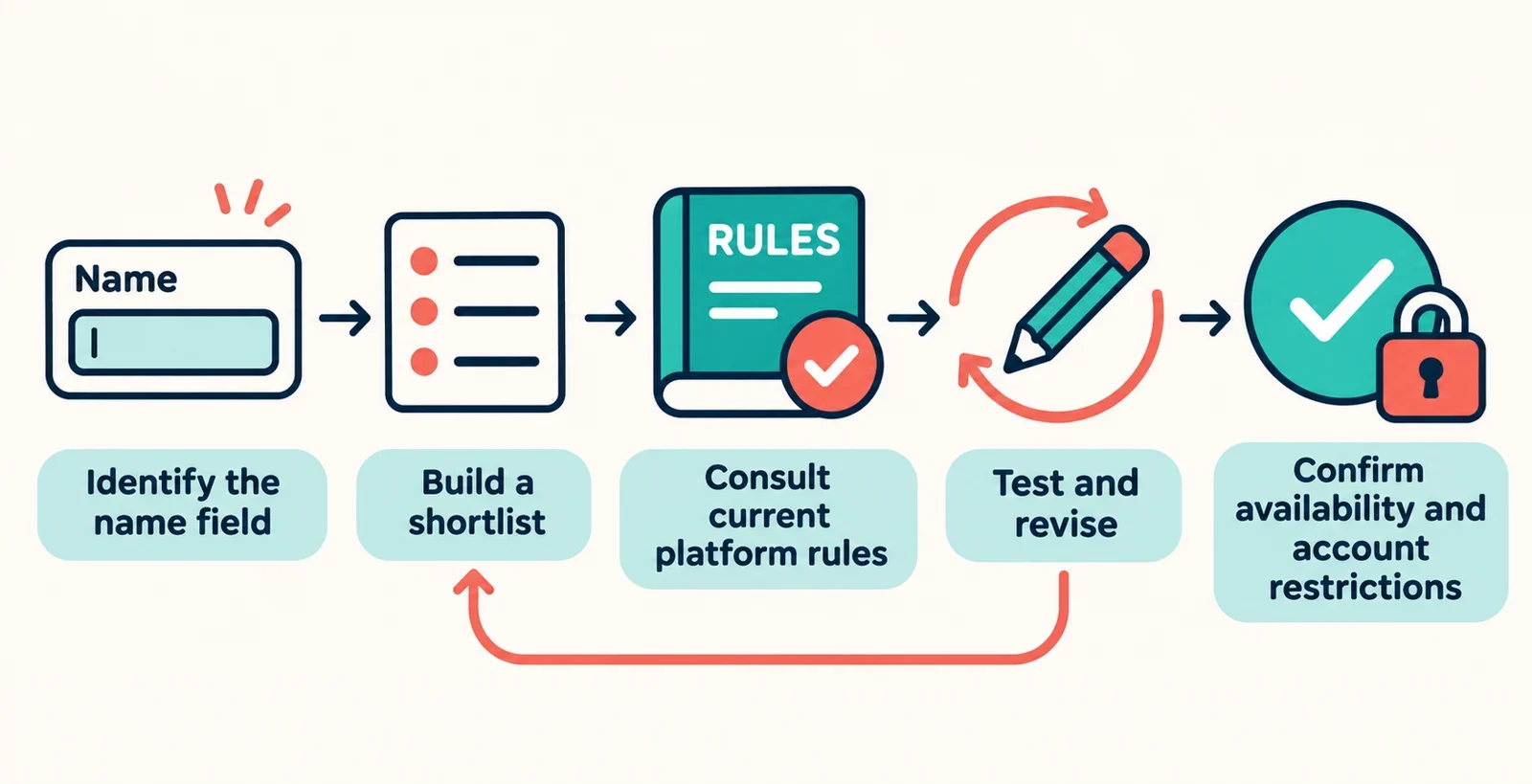
To check a generated username, identify the exact account field, look up the intended platform’s current requirements, and enter a candidate in that platform’s own validation field. Revise the name using the message you receive, then confirm availability and any account restrictions before saving it.
Treat generation as the start of a selection process. Keep several readable candidates so a rejection does not force you into a rushed choice. The workflow below helps you separate three questions: does the name meet the field’s format rules, can you select it for this account, and are you comfortable keeping it?
Identify the platform and the name field
Start by noting three details: the platform, the account type you intend to use, and the exact label beside the field you are editing. Copy that label into your notes. If you are updating an existing account, check the relevant account settings before generating names; for a new account, review the registration instructions.
Discord distinguishes usernames from display names and server nicknames. TikTok distinguishes an @username from a nickname. Keep those fields separate when looking for requirements. A rule you find for one field should not automatically become a rule for another.
Ask yourself: Which field am I actually trying to change? If the answer is unclear, use the platform’s help information to match the field label to the correct guidance. Also look for instructions specific to your intended account type. Resolve that uncertainty before building a shortlist, so you do not spend time optimizing a name for the wrong place.
Generate a shortlist with useful starting constraints
Choose a keyword that you would be comfortable making public, such as a general interest or an invented word. Avoid using sensitive personal information as a seed. Write down the part of the name you want to preserve: a recognizable word, a particular sound, or a simple spelling.
Inspect the generator’s visible controls. If it offers keyword, style, or length options, use those that support your goal. Do not assume an option exists because another generator provides it. If there is no length control, plan to edit or discard candidates after checking the platform’s limits.
Build a shortlist of three to five candidates with clearly different alternatives. For example, keep a short version, a version with a different second word, and a version without punctuation. These are starting choices, not promises of acceptance.
For each candidate, note what you are willing to change. Knowing whether the key word, overall sound, or compact spelling matters most makes later revisions easier.
Before trusting any platform filter, read what the generator says it checks. Look for a clear explanation of formatting checks and availability checks. If that explanation is unclear, take the output directly through the platform checks below.
Find the platform’s current username requirements
Use the platform’s official help or account documentation, searching for the exact field label you identified. Check that the guidance applies to the account type and action you are considering, whether registration or a later change. Avoid copying a rule from a search preview without opening the underlying guidance.
Make a short checklist before testing:
- Length: What are the minimum and maximum, and how should you check a name near either boundary?
- Characters: Which letters, numbers, or other characters are permitted?
- Spaces: Are spaces allowed in this specific field?
- Punctuation: Which marks are allowed, and are there placement restrictions?
- Case: Does the guidance distinguish uppercase and lowercase letters?
- Writing systems: Does it explain whether your intended script or accented spelling is supported?
Keep exact wording where interpretation matters. For example, a statement about a permitted punctuation mark does not answer whether that mark may begin or end the name; look for the placement rule separately.
If a detail remains unclear, seek clarification through the platform’s help options or the relevant field’s validation. Do not build your shortlist around an assumed exception. For a name close to a length limit, keep a shorter backup while you confirm how the platform assesses it.
Try a candidate in the platform’s username field
Enter one shortlisted candidate in the relevant registration or account-settings field. Check that you have opened the username field you identified earlier. Copy the candidate carefully and compare the entered text with your shortlist before interpreting the result.
Read the full validation message, including any nearby explanation. Record the exact candidate and what the field reports. If it identifies a specific character, position, or length problem, use that information for your next edit. If the message is general, compare the candidate against your checklist without guessing at a hidden rule.
Separate entering a name from committing an account change. If testing requires submission, review the applicable change restrictions before proceeding. Use any available validation before final confirmation.
A response about formatting answers the formatting question. Do not treat it as availability confirmation unless the platform explicitly addresses availability as well. If there is no clear result, keep the candidate pending while you find the next supported check.
Revise invalid characters or length and test again
Revise the candidate around the problem the platform identifies. Keep a copy of the original so you can compare versions and avoid losing a useful word or spelling.
- Fix a rejected character. Remove it, or replace it with something the platform explicitly permits. If a period is rejected in
cedar.orbit, trycedarorbitand test again. - Check punctuation position. If the rules allow a mark only in certain positions, move or remove it accordingly. Permission to use a mark is not permission to place it anywhere.
- Adjust length. Shorten a less important word, remove an optional addition, or choose a different candidate. If the name is too short, add a meaningful element within the documented requirements.
Make one deliberate change at a time when the cause of rejection is unclear. Then recheck the complete revised name, including its length and punctuation. A local correction should still receive a full test.
Read the result aloud and type it once from memory. If your revision makes the name awkward to recognize or reproduce, return to another shortlisted candidate.
Check availability separately from valid formatting
Keep the following checks separate when comparing results:
| Check | How to use the result | What to confirm separately |
|---|---|---|
| Generator filter | Compare it with the generator’s stated checks. | Acceptance by the intended platform. |
| Public profile search | Treat it as a result of that particular search. | Whether your account can claim the name. |
| Third-party availability label | Read what the checker claims to verify. | Current availability in the platform’s own account flow. |
A search with no matching profile should not become your reason for declaring a name available. Likewise, do not turn a generator’s formatting result into an availability claim. Ask what question each check actually answered before relying on it.
Return to the intended platform for confirmation. If its message says the candidate cannot be selected, follow the explanation it provides or try a backup. If the message does not identify the reason, avoid labeling the problem as a formatting failure or an existing account without further clarification.
Record formatting and availability separately in your notes. This makes it easier to choose another candidate without repeating every earlier decision.
Choose a candidate after checking account restrictions
Before completing your choice, review any applicable restrictions on reserved names, account types, and username changes. Look for guidance covering both your immediate selection and a possible later change. If you are renaming an existing account, resolve those conditions before saving.
Use these final questions to make the decision:
- Does the candidate satisfy the documented requirements for this field?
- Has the platform confirmed that this account can select it?
- Have you checked whether any reserved-name restrictions apply?
- Do you understand any conditions attached to changing it later?
If an account-specific restriction remains unclear, use the platform’s official help or support options before committing. Keep your backup candidates ready rather than repeatedly altering a name around an unexplained rejection.
Once the checks are complete, save or confirm the exact spelling you tested. Review any confirmation the platform provides, and check the resulting account field. Retain a brief note of the chosen name and the field it belongs to so future edits start from the right place.