On this page
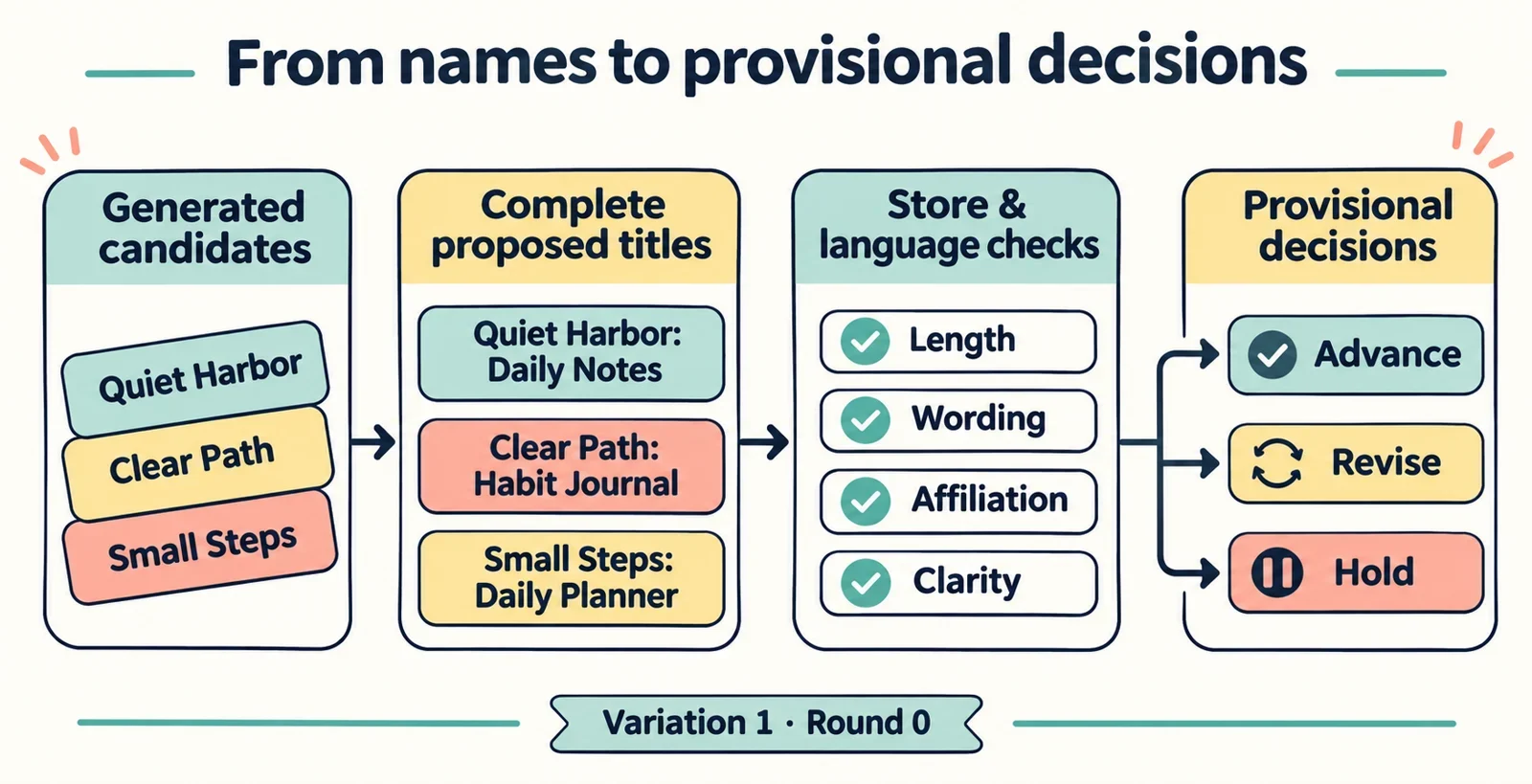
Check generated brand names as complete proposed app titles, including any descriptive wording, for each store and listing language you intend to use. Compare the exact text with current title and metadata requirements, investigate possible confusion with other names, and then test whether the revised title still explains the app clearly.
Build a short review record as you go. Keep the generator output, the proposed submission text and your decision together so you can see what changed. Treat a candidate as provisional until you have checked the applicable documentation and submission field; a promising name alone is not enough to make that decision.
Define the app, stores and listing languages
Start with one sentence describing what the app actually does and who it serves. For a hypothetical app that helps people organize tasks, use that description to judge whether a proposed title creates the right expectation. Avoid adding functions simply because they make a candidate sound more appealing.
Next, list the stores and listing languages you intend to use. Give each combination of store and language its own review entry, even when you initially propose identical wording. This keeps a decision for one intended listing from being treated as a decision for all of them.
Separate these two pieces in your notes:
- Candidate brand: the name you are considering.
- Complete proposed title: the exact brand and any descriptive wording you plan to submit.
For example, compare [Brand] with [Brand]: Task Lists as hypothetical title formats. Evaluate the complete version you intend to use. A name acts as a cue to what people expect, so keep the app description beside it throughout the review.
Generate a manageable shortlist
Choose a shortlist small enough that you can review every candidate carefully. Keep names that seem relevant to the app description and sufficiently distinct from one another to make the comparison useful.
If your chosen generator offers keyword, style or length inputs, change one input at a time. For the hypothetical task app, you might start with a keyword such as “planning,” then try another activity word while keeping any other available settings unchanged. Use your notes to connect each saved name with the choice that produced it.
Save each promising output with the inputs you actually used and a short reason for keeping it. For example, write “easy to say” or “suggests the main activity,” then test that impression later.
Do not assign a compliance result at this stage. Generation gives you candidates to evaluate; the separate store review determines whether the proposed wording can remain on your shortlist. Keep a backup candidate as you proceed so a problem discovered during review does not force you to restart the entire naming exercise.
Check the complete title's length
Assemble the complete title before checking length. Include the descriptor, spaces, punctuation and any other text you intend to enter. Measuring only the brand leaves part of the proposed submission unchecked.
For each intended listing, follow this sequence:
- Find the current official requirement for the title field.
- Record the applicable limit and any explanation of how characters are counted.
- Compare the exact proposed text using that documented approach.
- Check the text in the relevant submission field when available.
- Repeat the process for each listing language.
If the counting method is unclear, leave the length result unresolved until you can verify it. Do not substitute a remembered limit or assume that an external counter matches the submission field.
When a title needs shortening, try removing unnecessary descriptive wording or choosing a shorter candidate. Keep the app’s meaning in view as you edit. Save the revised title as a new version, then repeat the length check. Also return to wording and clarity checks, because an edit can change more than length.
Screen wording across the relevant metadata fields
Review wording against the current requirements for the particular field where it will appear. Write down both the rule you checked and its scope: title, subtitle, description or another field you actually intend to use. Do not assume that a requirement for one field answers a question about another.
Use a checklist like this to guide your reading:
| Concern | Question to resolve |
|---|---|
| Promotional wording | Does the applicable rule permit this claim in this field? |
| Ranking or superiority claims | What does the current guidance say about the proposed wording? |
| Repeated keywords | Does the relevant rule restrict the repetition you propose? |
| Characters or formatting | Are the exact characters and presentation allowed here? |
Resolve each question using the applicable current guidance, and record the requirement before marking wording unacceptable.
Where a rule clearly applies, revise the candidate and explain the change in plain language. Where its application remains uncertain, mark the issue for further checking. If you move wording to another metadata field, review it there before keeping it. Finally, check whether removing a claim or descriptor leaves an accurate description of the app.
Investigate copying and implied affiliation
Compare each shortlisted title with existing app and service names. Search for the complete proposed title and the brand portion separately, then examine relevant similarities. Include close spelling variations and combinations that borrow a recognizable brand term.
For each possible match, ask what a reader might infer: the same developer, an official version, a partnership or an endorsement. Treat those as questions to investigate rather than conclusions drawn from a search result.
Keep a note of the similar name, the wording that concerns you and any permission question that needs resolution. If you intend to claim a connection, verify the basis for that claim and check the applicable store guidance before retaining it. If a question needs someone else’s permission or confirmation, record who can answer it and what you still need to establish.
When a candidate depends on a small spelling change to another name, consider a more distinct alternative. Review the whole title again after the change, including its descriptor. Keep unresolved similarities visible in the decision record, and avoid treating a search with no obvious match as sufficient reason to close every affiliation question.
Test whether the compliant version remains clear
Once a version has passed the checks you can currently complete, test what it communicates. A name shapes expectations, so a technically acceptable title still needs to point readers toward the app you intend to offer.
Show intended users the exact revised title without first explaining its meaning. Ask:
- What do you think this app helps you do?
- Which part would you remember as its name?
- How would you say the title aloud?
- Does any wording suggest a connection with another app or company?
Compare their answers with your original app description. Record specific misunderstandings, such as interpreting a task organizer as an app for a different activity. Revise the wording if the same confusion persists.
Repeat the exercise for every intended listing language, using people able to assess that language. Also consider the markets, platforms and contexts where you plan to present the name. Recheck pronunciation, recognition and descriptive clarity after shortening a title or removing questionable wording; your earlier reactions relate to the earlier version.
Choose, revise or hold each candidate
Make the final comparison using complete titles at their latest revision. Keep one record for each candidate, store and language combination, with these fields:
- Exact proposed title and revision.
- Store, listing language and requirement review date.
- Length result and submission field validation result.
- Wording concerns and the fields they affect.
- Similar names, possible affiliation concerns and permission questions.
- Clarity feedback, unresolved checks and next action.
Assign one practical decision to each record. Choose a candidate when the checks you can substantiate support moving forward and its meaning remains clear. Keep that choice provisional until the applicable current documentation and submission fields have been checked. Revise when there is a specific edit to make, such as replacing a questionable phrase. Hold when a requirement or similarity needs further investigation before you can decide.
After any edit, repeat every affected check and attach the new result to the new wording. Before submission, confirm that the title you enter matches the version you reviewed. This leaves you with a usable decision for each intended listing and a clear next step wherever work remains.