Table of contents
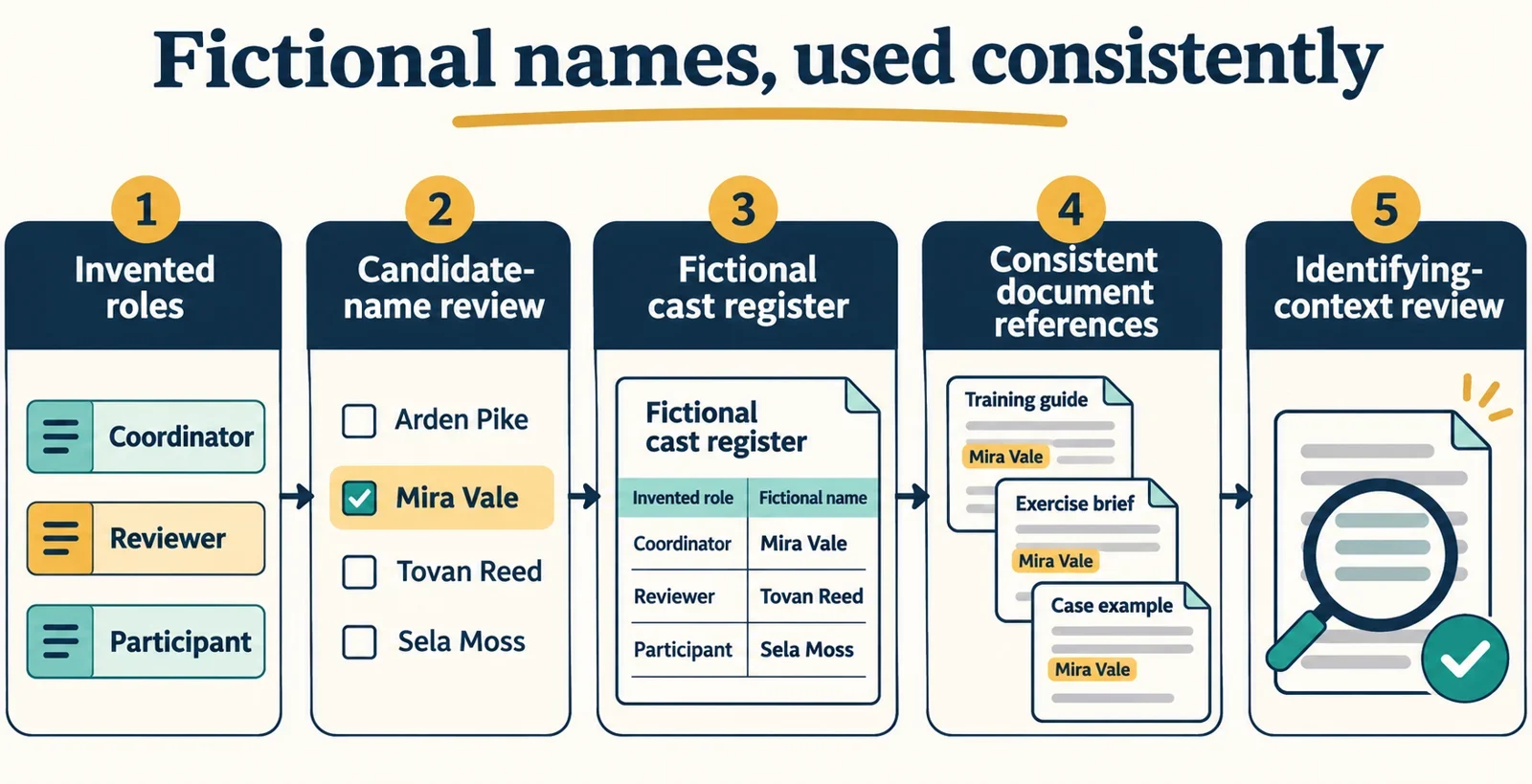
To use generated person names effectively, define your fictional roles first, review a shortlist, and record the approved names before drafting connected exercises. Keep that cast consistent in instructions, dialogues, messages and answer keys. Prefer a scenario built from invented details whenever it can meet the learning objective.
Name replacement also needs a separate privacy check. A document can still reveal someone through contact details, dates, roles, events or combinations of information. Treat choosing readable fictional names and deciding whether a document is suitable to share as separate tasks. The workflow below covers both, without assuming that a generator provides saved lists, repeatable results or any particular input control.
Define the fictional people your exercise needs
Start with the decision learners must practise. For example, an entirely invented exercise might ask a trainee to seek clarification when an instruction is incomplete. That gives you two useful roles: the trainee who identifies the uncertainty and the supervisor who responds. Add another character only if that person contributes a distinct action, relationship or decision.
Write a short scenario brief before choosing names:
- What must the learner notice or decide?
- Which person asks, explains, approves or responds?
- Which relationships must remain clear throughout the exercise?
- What information does each character need to know?
Keep this brief focused on the learning task. If a character needs to ask a question, give them an invented reason connected to that task. There is no need to borrow a real colleague’s biography, working history or personal circumstances to make the exchange understandable.
For the example used throughout this guide, the trainee receives an incomplete instruction and asks the supervisor to clarify the next step. The exercise tests whether learners recognize the need for clarification. It does not require a real workplace, a dated incident or an actual employee record.
Before moving on, ask: could the learning objective be met with fewer people or less personal detail? Simplifying the cast gives you fewer identities to maintain and lets the exercise concentrate on the intended decision.
Choose inputs for the person-name generator
Check which controls are available in your chosen person-name generator. Use the following approach where the corresponding options are available; treat suggested inputs as starting points for review rather than required settings.
| Possible input | Practical starting choice | What to review afterward |
|---|---|---|
| Language | Select a language appropriate to the exercise | Whether learners can comfortably read and discuss the candidates |
| Style | Choose a style that fits the document’s tone | Whether the suggestions distract from the learning task |
| Keyword | Use a non-sensitive term, such as “training,” if keywords are supported | Whether the results suit the roles you planned |
| Candidate count | Request a manageable shortlist | Whether you have enough distinct options to compare |
| Length | Choose a length suited to the available space | Whether full names remain legible in worksheets and tables |
For an initial comparison, you might request six candidates if a count control is available. That is an example working choice. If none suits the exercise, adjust one available input at a time so you can compare the next group deliberately.
Do not enter a real person’s name, contact information or personal history as a keyword merely to produce a replacement. Keep the input connected to your invented exercise.
Do not assume that a seed field, if present, or repeating the same settings will reproduce the same names. Check any repeatability you intend to rely on, and preserve your approved cast separately. Likewise, make your own record rather than depending on a saved-list feature being available. Your training documents should remain usable after the naming session ends.
Select names learners can distinguish
Review candidates together as a cast, not just as individual names. Put them into a short sample instruction and dialogue, then check whether a reader can follow who acts and who responds without repeatedly looking back.
Compare spelling, likely reading difficulties, similar initials and repeated surnames. If two candidates look very similar on the page, consider choosing a different pairing. If spoken discussion is part of the exercise, read the names aloud during review and consider providing an agreed pronunciation guide where useful.
Generated suggestions should not be treated as proof of cultural accuracy or uniqueness. If the exercise requires names associated with a particular language or community, arrange an appropriate review before making that association part of the lesson. Where that association serves no learning purpose, avoid adding it as character background.
Shared surnames also deserve a deliberate choice. If the characters are meant to be related, record that relationship explicitly. If they are unrelated and the shared surname adds confusion, select another candidate. Do not expect the name alone to communicate the intended relationship.
For a final check, temporarily remove the role labels from a sample exchange. Can a reviewer still tell which person is speaking? Restore the labels afterward, but use any confusion to improve the shortlist. Choose the cast for clarity and suitability, then stop generating once you have a workable set.
Record a reusable fictional cast
Create a cast register as soon as you approve the names. Keep it with the exercise materials so anyone editing a worksheet, dialogue or answer key can use the same spellings and references.
The following names are explicitly fictional illustrative placeholders, not demonstrated generator outputs:
| Approved full name | Role | Approved short form | Initials |
|---|---|---|---|
| Mira Exampleton | Trainee | Mira | M.E. |
| Tovan Sampleford | Supervisor | Tovan | T.S. |
Add a brief use note beside the register: introduce each character by full name and role, then use the approved short form when the reference is clear. Reserve initials for places where they serve a useful purpose and cannot be confused with another character.
If a scenario needs a nickname, handle or email-style reference, approve that form explicitly before inserting it. Do not improvise a new version in each document. Where contact details are unnecessary, omit them rather than creating extra references to maintain.
Store the register in an ordinary document or table you can retain independently of the generator. Record the selected names themselves; a note containing only the inputs may not let you recover the same cast.
You can also record an editorial status such as “approved for this exercise.” If a name changes later, update the register and every connected document together. This makes the register a practical editing reference rather than an abandoned list of early candidates.
Keep the same identities across connected exercises
Carry the approved cast through every item in the learning sequence. A reader should be able to connect a person introduced in an instruction sheet with the same person speaking in a dialogue and discussed in an answer key.
For the invented clarification exercise, use the register this way:
| Document | Example wording | Identity check |
|---|---|---|
| Instruction sheet | “Mira Exampleton, the trainee, receives an incomplete instruction from Tovan Sampleford, the supervisor.” | Establish both full names and roles |
| Dialogue | “Mira: Could you clarify the next step?” | Use the approved short form with a clear speaker label |
| Answer key | “Mira Exampleton should ask Tovan Sampleford for clarification before proceeding.” | Connect the dialogue reference to the full name |
Review questions that use a full name while the accompanying text uses a short form. The intended connection should be clear from the introduction and surrounding text, rather than requiring the learner to guess.
Search the connected documents for full names, short forms, initials and any other approved references. Check that role descriptions still match the register and that an edit has not assigned one character’s action to another.
If you add a second Mira later, decide how to distinguish them before distributing the exercise. You might retain full names more often or choose a different fictional name. Resolve shared initials in the same deliberate way. Avoid introducing an unrecorded nickname simply to repair an ambiguous sentence.
Remove identifying details beyond names
After checking name consistency, review the document for information that could still point to a real person. This matters especially when an exercise began as an adaptation of an actual record. Replacing the most visible name does not address everything else in the text.
Check direct references such as contact details, personal identifiers, addresses and case references. Then examine the surrounding story: dates, roles, locations, unusual events and sensitive content. Ask whether someone familiar with the situation could recognize the person from those details together.
Initials, codes and abbreviations also need attention. They can leave someone recognizable when combined with context, so shortening a reference is not enough on its own.
Review each detail against the learning objective
| Detail under review | Question to ask | Practical editing choice |
|---|---|---|
| Contact information | Does the learner need to contact anyone? | Remove it if the exercise does not require it |
| Date or location | Does this detail affect the decision being taught? | Omit it or invent suitable context when the objective permits |
| Case reference | Is it needed to connect parts of the exercise? | Use an explicitly fictional reference consistently if necessary |
| Personal history | Does it contribute to the learning task? | Replace unnecessary history with a simpler invented situation |
| Distinctive event | Could the event reveal who inspired the exercise? | Rebuild the scenario around the underlying learning need |
Do not change a detail mechanically if doing so would undermine the task. First identify what the exercise needs that detail to accomplish, then invent context that serves the same purpose. For Mira and Tovan’s clarification exercise, no real contact information, dated incident or personal background is needed.
Understand what name replacement does and does not achieve
A consistent fictional name helps readers follow a character through an exercise. It does not, by itself, establish that the document is anonymous. Pseudonymisation does not necessarily amount to anonymisation, and a fictional label cannot settle whether the remaining details identify someone.
Keep two review questions separate. First, have you used the approved replacement name consistently? Second, could someone still recognize a real person from the document? The first checks the editing work. The second requires attention to the content and context that remain.
An initials-only reference or a code may still be recognizable alongside a distinctive role, date or event. Similarly, adding “fictional training example” to a document does not resolve identifiable details carried over from a real situation.
Before sharing, read the complete exercise as its intended audience would encounter it, including instructions, dialogue, attachments and answer keys. Check both the cast references and the surrounding personal details. Seek an appropriate review when the document’s suitability for sharing remains uncertain.
Where the learning objective allows, build the exercise from an invented situation at the outset. Keep only the detail needed to teach the decision, maintain the approved cast, and review any later additions with the same care. That gives you a reusable training document without making name replacement carry a privacy claim it cannot establish.