On this page
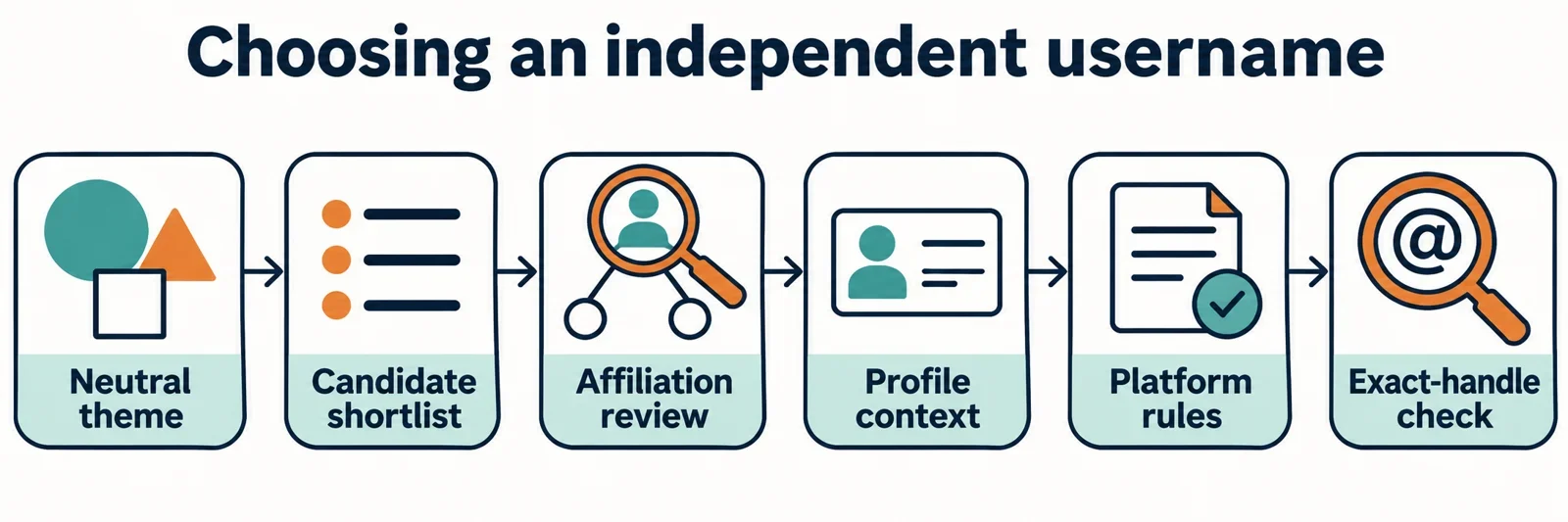
Choose a generated username around a personal theme, then review it for company references and words that suggest a service role. A useful handle gives readers a clear sense of your independent identity without inviting them to mistake you for an authorized support account.
Start with a non-sensitive interest or image, generate several candidates, and assess each one alongside the rest of your profile. Before settling on a spelling, consult the intended platform’s current identity and username rules and check the handle there directly. Keep a readable alternative ready so an unavailable first choice does not push you toward a confusing company or authority reference.
Start with an independent identity
Write one sentence describing what the account should communicate: “I share sketches inspired by evening walks,” for example. Use that sentence to choose a keyword such as lantern, notebook, or moon. These are suggested creative starting points; choose something that fits your own purpose.
Choose a theme you are comfortable making public. You do not need to include your full name, workplace, birth date, or precise location to make a handle meaningful. An interest, imagined scene, or recurring creative motif can give you material to work with while keeping personal details out of the naming process.
Next, list the references you want to avoid. Consider company names, recognizable company abbreviations, product references, and role words that could make the account sound like a service channel. Ask whether someone encountering the handle alone might expect assistance from an authorized representative.
Use your identity sentence as the selection test throughout the process. If your purpose is sharing drawings, a candidate built around sketchbooks deserves consideration. A candidate built around a company name and “help” needs revision because it points toward a different role.
Generate a shortlist and adjust the inputs
Use the controls the generator actually provides. If the available options include the following fields, give each one a clear purpose:
- Language: Choose the language you want to review, and check the resulting wording for meanings you understand.
- Style: Select an offered style that suits your identity sentence, such as a playful direction if that option exists.
- Keyword: Begin with one neutral theme, such as lantern or sketchbook.
- Count: Request a manageable batch that you can compare carefully.
- Length: Choose an offered limit or range that leaves room for readable wording, then verify the platform’s requirements separately.
Save a small shortlist before changing several settings. For each candidate, note what you like, what feels awkward, and whether any part suggests a company role. This makes the next adjustment purposeful: you might keep the theme while trying a different available style or length setting.
If no candidates appear, try a simpler keyword or widen the length range where that control exists. Change one input at a time so you can judge whether the adjustment helps. Avoid treating an empty result as proof that every matching handle is already taken.
Review every output yourself. Keep generation, affiliation review, and platform availability checking as separate decisions; do not assume that a suggested name has passed the latter checks.
Screen combinations that suggest official support
Read each shortlisted handle as though it belonged to someone you had never encountered. Look for a recognizable company reference combined with words such as support, helpdesk, admin, or official. The useful question is whether the combination could invite an expectation of employment, authorization, or customer assistance.
In the invented examples below, SampleCompany is a fictional company placeholder. The alternatives demonstrate changes in presentation; check any spelling you consider using.
| Candidate | Impression to examine | Neutral alternative |
|---|---|---|
| SampleCompanySupport | Could suggest a company assistance account | LanternNotebook |
| SampleCompanyHelpdesk | Could imply a designated service role | WillowSketches |
| OfficialSampleCompany | Could suggest company authorization | EveningDoodles |
| SampleCompanyAdmin | Could imply administrative authority | OrbitJournal |
Read the entire combination instead of treating the review as a banned-word exercise. Consider joined words, abbreviations, and modifiers together. Adding a personal-looking number to a company-and-support combination may leave the central impression unresolved.
For each questionable candidate, try two edits: remove the company reference, then remove the role wording. Compare those versions with a fresh name based on your original theme. Ask a trusted reader what role they would expect the account to have before explaining your intention. Use that response to identify ambiguity, then evaluate the candidate against the intended platform’s rules.
Judge the handle alongside the whole profile
Display names and unique usernames are different profile fields. Review both, then consider the avatar, biography, and linked pages as part of the same presentation. A clear username still deserves another look if the surrounding profile introduces company or authority cues.
Make a simple draft of the profile you intend to publish. Put the handle beside the display name, describe the proposed avatar, and write the biography. Read them together and ask: “Would a stranger reasonably expect this account to speak for a company or resolve an account problem?”
Look especially closely at combinations. A company reference in the display name, company-associated imagery, and a biography offering assistance could collectively create an impression you did not intend. Replace elements that interfere with your independent identity, using the same personal theme across the profile where appropriate.
If you plan to include an independence statement, read the profile once without that sentence. Does the remaining presentation still suggest authorization? Then restore it and assess the whole profile again. Treat the statement as one element to evaluate under the platform’s guidance. Revise the handle or surrounding presentation when the overall impression remains confusing, and make the account’s actual purpose easy to understand.
Check the intended platform's identity rules
Before choosing a final candidate, open the intended platform’s official help or policy pages. Search there for guidance on impersonation, misleading affiliation, usernames, and any account category relevant to your purpose. If you intend to run a fan or commentary account, look specifically for the platform’s wording about that use.
Work through four questions with your proposed profile beside you:
- What conduct or presentation does the platform describe as impersonation or misleading affiliation?
- What current requirements apply to the username’s spelling, length, or characters?
- Does the guidance address the display name, biography, avatar, or other profile elements?
- If special labeling is discussed for your account type, where and how does the guidance say it should appear?
Apply the actual wording to the complete profile. Avoid assuming that a label such as “unofficial,” “fan,” or “personal” settles the question. Check whether the guidance addresses your proposed presentation and whether other profile elements undermine its intended meaning.
Keep a brief private note of the relevant requirements and the changes you made. If the guidance leaves your candidate unclear, choose a neutral alternative with fewer company or authority cues. Consult the platform’s official clarification channel if needed, without promising yourself that a particular disclaimer will secure acceptance.
Choose a clear alternative and confirm the spelling
Return to the strongest candidates built around your independent theme. If a name still depends on a confusing company reference, replace that reference with an interest, image, or meaningful personal modifier. For example, an invented candidate such as LanternSketchNotes keeps a drawing-related purpose visible without introducing a service role.
Compare your finalists in practical use:
- Read each one aloud and ask someone to write what they hear.
- View the exact spelling without spaces and check for unintended word combinations.
- Ask whether a reader can explain the account’s purpose from the handle and profile together.
- Keep a second readable choice that preserves the same personal meaning.
When your preferred spelling is unavailable, try a related theme word or a meaningful modifier. Review the revised handle from the beginning, especially if you are tempted to add help, admin, or official simply to obtain a different string.
Check the exact handle directly on the intended platform and follow its current selection process. Treat an availability lookup as information about the result shown at that moment; it does not reserve the username. Confirm that the platform has actually accepted your chosen spelling before relying on it elsewhere.
Finally, read the accepted username beside the display name, avatar, and biography once more. Your finished choice should communicate the independent identity you intended and satisfy the requirements you checked.